Player guides
Help
Find your issue, try the first checks, and know what to send support.
What’s going wrong?
Choose your issue for the first checks and what to send staff.
- Use ARK: Survival Evolved on Steam. MESA uses ASE, not ARK: Survival Ascended.
- In Steam, open ARK → Properties → Betas → Beta Participation and select preaquatica – ASE: Pre-Aquatica. Let the download finish before launching.
- Choose your cluster and map on the Servers page. Check its status, then use its join button or copy the listed address into Steam’s server favorites.
- Let all game and Workshop downloads finish. If the server is restarting or wiping, wait until it is back online before trying again.
If it still fails, send the exact error, cluster, map, time with timezone, and whether other MESA maps work.
Check servers & join →- Close ARK and check Steam’s Downloads page for pending game or Workshop updates.
- Open the MESA Steam Collection linked below and check that you are subscribed to its mods. Allow every download to finish.
- Restart Steam if Workshop updates are not starting, then launch ARK and let it finish installing mods before joining.
- If the same error remains, use the detailed Mod Mismatch guide below. Keep the error message so staff can identify the affected mod.
Include the mod name or ID from the error, a screenshot, and the cluster and map. Don’t delete your entire ARK installation as a first fix.
MESA Steam Collection →- Close ARK. In Steam, open ARK → Properties → Installed Files → Verify integrity of game files.
- Let verification and any replacement downloads finish. Check that the required map DLC is installed in ARK’s DLC settings.
- If the problem started after changing an INI preset, restore the backup you made before editing and try again.
- Record whether the crash happens before the menu, while joining, or only in one location. That helps distinguish a local installation issue from a server issue.
Attach the crash error or screenshot, map, time with timezone, and the steps that reproduce it. Keep saves and config backups before considering a reinstall.
Steam’s file verification guide →- Check whether the problem is low frame rate on your PC or a delayed server response. Include that distinction in a ticket.
- Lower demanding graphics options in ARK and compare the same location before and after each change.
- Use the PvP INI presets below if you want a MESA-supported preset. Close ARK and back up BaseDeviceProfiles.ini before replacing it.
- If a preset causes missing visuals or a new crash, restore your original file and restart ARK. Change one thing at a time so you can tell what helped.
Send your map, approximate FPS, what was happening, and whether nearby players saw the same delay. Put any base coordinates in a private ticket.
INI presets & detailed guides →- Sign in to the website with the Steam account you use to play on MESA.
- Open Your Account and follow the Discord linking instructions shown there. Use your own Discord account and keep the verification code private.
- Return to Support after linking. If a code expires, start a new linking attempt instead of reusing the old code.
- If login or linking is unavailable, use the support Discord linked in the footer and include the exact error. Never share your Steam password, login cookies, or recovery codes.
A screenshot of the error and the step that failed are enough to start. Hide any verification code in the screenshot.
Your Account →- Check the receipt or order status and confirm the Steam account, selected server, product, and purchase type.
- Confirm whether you bought a one-time rank or a recurring subscription. Keep the order reference so staff can identify the purchase.
- If delivery is missing or the selection was wrong, open a store support ticket and explain what you bought and what arrived.
- Keep receipts in the private ticket. Hide full card numbers, billing addresses, and unrelated transactions. Don’t purchase again just to retry delivery.
Include the order reference, purchase time with timezone, selected server, and a redacted receipt. Staff will check the order before deciding the next step.
Open player support →- Confirm the cluster, map, and Steam account you last played on. Check whether a wipe or maintenance happened in Changelog and Settings.
- If a transfer failed, record the origin map, destination map, and the last successful step. Avoid repeating the transfer while the result is uncertain.
- Open a private support ticket with your player and tribe names, the time with timezone, and a clear before-and-after description.
- If staff need your location, use the CCC guide below and paste coordinates only in the private ticket. Include screenshots or a short clip if available.
Report what is missing and when you last saw it. Staff need to investigate; a report does not automatically guarantee a replacement or rollback.
Open player support →- Read the relevant rule, then choose the appropriate support category: cheater report, ban appeal, or staff report.
- State the cluster, map, time with timezone, and player or tribe names. Explain what happened without relying on a name alone as proof.
- Keep original clips and screenshots. For a longer video, include the timestamps staff should review.
- Send evidence through private support. Keep live player locations, Steam identifiers, and staff-only information out of public posts.
For an appeal, include the ban reason you saw and your explanation. For a report, include the behavior and evidence that supports it.
Read MESA rules →Detailed guides
INI files are allowed on MESA. These go in the BaseDeviceProfiles.ini file inside your ARK Engine config folder. Pick the preset that matches your playstyle.
How to install:
Engine → Config...\ARK\Engine\Config\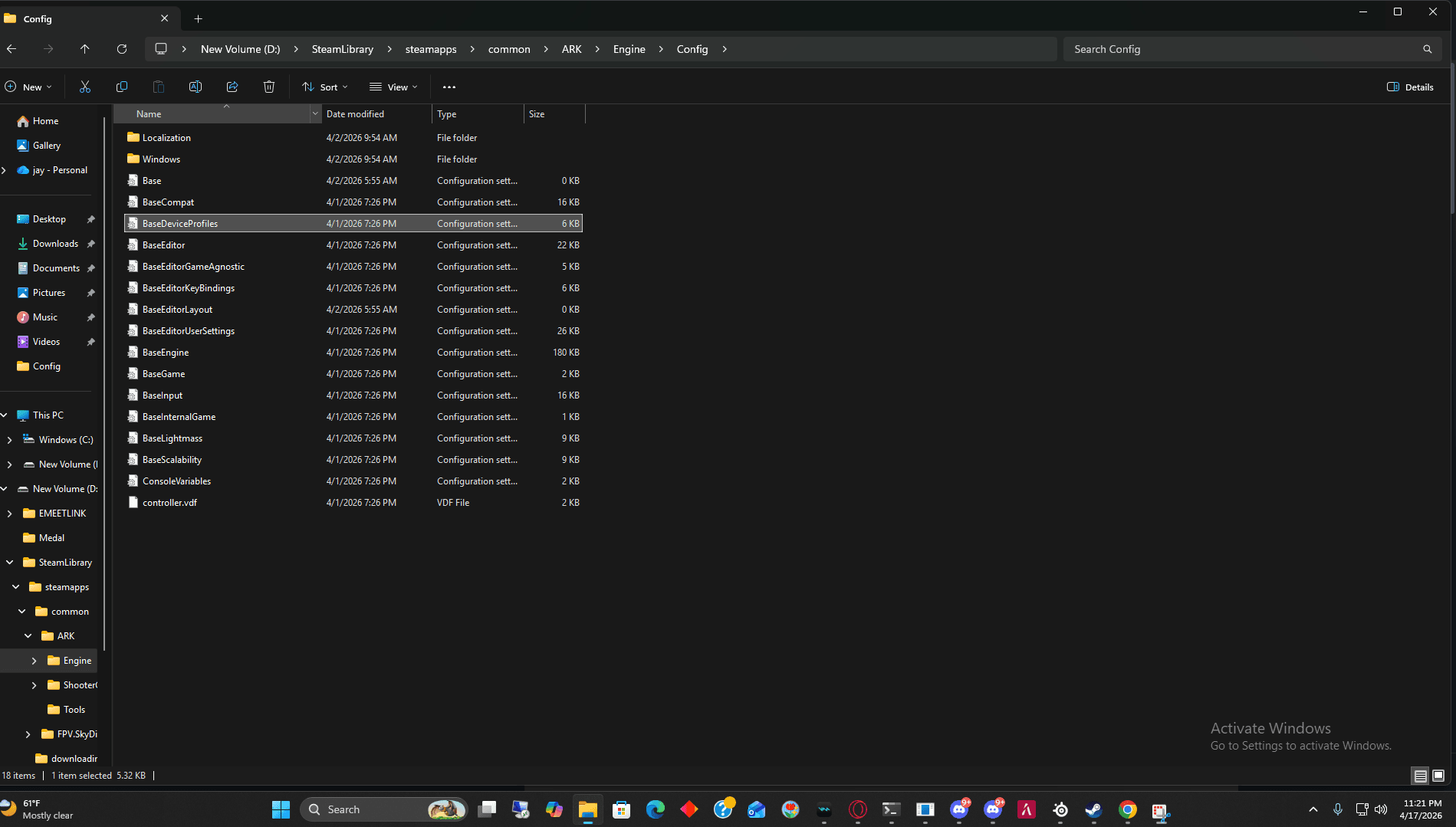
Balanced — good visuals with PvP tweaks
Loading...
MESA runs on ARK: Survival Evolved (ASE), not ASA. You must be on the pre-Aquatica branch.
Step 1 — Switch to pre-Aquatica branch:
Step 2 — Add servers to favorites:
Bought something on the MESA Store? Here is where it shows up.
We need your CCC coordinates to find you in game. Paste them in the private support ticket where staff asked, never in a public community channel.
Tab; if that does not work, check or set Toggle Console in your in-game key bindings.ccc without quotation marks and press Enter.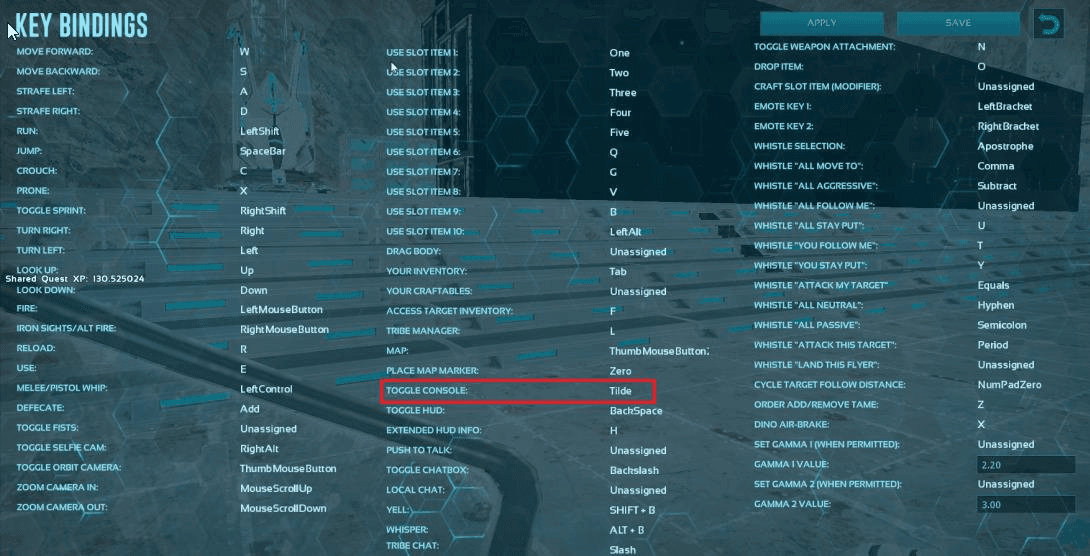
Website sign-in identifies your Steam account automatically. If staff ask for an ID, or an application asks for tribe members' Steam IDs, use this guide and share them only in private support.
steamcommunity.com/profiles/7656...)Getting a "Mod Mismatch" or "Mod Version Mismatch" error? Your mods are out of date.
Verify Game Files (checks for missing or damaged files):
Crystal Isles crashing:
VPN issues:
Still not working:
File verification steps: Steam Support.
PFind tribematesF2In-game shopF3Capture TP leaderboardF4Armor durability infoCtrl+UReset skinsMMBPing your tribeL.CtrlCryopod menuTabOpen console